

Website Design for Civil Engineers: What Your Homepage Must Include
When someone lands on your civil engineering website, they’re making a split-second judgment: “Can this person or firm solve my problem?”
Your homepage is where that decision happens.
A well-designed homepage isn’t just visually appealing—it positions you as a trusted expert, showcases your capabilities, and guides potential clients to take the next step. Unfortunately, many engineering firms still rely on outdated designs, unclear messaging, or walls of technical jargon that leave visitors confused instead of confident.
In this guide, you’ll learn exactly what your homepage must include, how to structure it for clarity and conversions, and how to make sure your site communicates your professionalism the same way your engineering work does.
Let’s get into it.
Why Website Design Matters for Civil Engineers
Civil engineering is a highly technical field, but your website shouldn’t feel technical to your visitors. Most clients—whether municipalities, contractors, developers, or homeowners—aren’t engineers. They’re looking for someone who can:
-
Understand their needs
-
Provide reliable and safe solutions
-
Show experience through real projects
-
Explain services clearly
-
Deliver results on time and on budget
Your homepage is the first place to prove you can do all of that.
A great homepage helps you:
1. Build trust instantly
People hire civil engineers based on credibility. Your homepage should show you’re qualified, experienced, and dependable.
2. Communicate your services clearly
Visitors should quickly understand exactly what you offer and who you serve.
3. Guide users to take action
Whether you want them to request a quote, schedule a consultation, or contact your team, your homepage should funnel them to the right place.
4. Improve search engine visibility
A well-structured homepage makes it easier for Google to understand your business, boosting your rankings and organic traffic.
Step-by-Step Guide: What Your Civil Engineering Homepage Must Include
Below is a breakdown of the essential elements every civil engineering homepage needs—organized in the order your website visitors naturally scroll.
1. A Clear, Compelling Hero Section
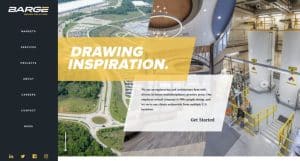
This is the first thing visitors see—usually a full-width image or banner with a headline and a call to action.
What to include:
-
A strong headline telling people what you do
Example: “Civil Engineering & Site Development Solutions for Commercial and Residential Projects” -
A short supporting sentence explaining your value
Example: “We deliver practical, efficient, and code-compliant designs tailored to your project’s needs.” -
A primary call-to-action (CTA)
Examples: “Request a Quote,” “Schedule a Consultation,” “Start Your Project” -
A professional image
Ideally a real project photo, drone shot, or team image—not generic stock art.
Why it matters:
You have 3–5 seconds to communicate your service and credibility. A clear hero section prevents confusion and reduces bounce rates.
2. A Short, Client-Focused Overview
Next, include a concise paragraph that explains who you are and who you serve. Keep it simple and people-oriented.
Example content:
“Based in [City/Region], we provide civil engineering services for developers, contractors, municipalities, and property owners. From grading plans to stormwater management to full site design, our team delivers efficient solutions that meet local regulations and project timelines.”
Pro Tip:
Avoid long lists of credentials here—you’ll share those later. This section is about clarity and connection.
3. A Showcase of Your Core Services
Your homepage should highlight your main services using short blurbs and icons or images. Make it skimmable.
Examples of civil engineering service categories:
-
Site Planning & Design
-
Grading and Drainage Plans
-
Stormwater Management
-
Erosion and Sediment Control
-
Utility Design
-
Structural Engineering Support
-
Permitting Assistance
-
Construction Administration
Each service should have:
-
A simple title
-
One-sentence description
-
A link to “Learn More”
Why this works:
Clients want to confirm you can handle their project, but they don’t want to read dense technical explanations. Short descriptions keep them engaged.
4. Featured Projects or Portfolio Highlights
Civil engineering is proof-based. Clients judge you by your work.
How to present projects:
-
Use 3–6 project thumbnails
-
Include project titles (“Municipal Drainage Upgrade – City of ____”)
-
Add a short success statement
-
Link to a full portfolio page
What clients look for:
-
Project size and scope
-
Level of complexity
-
Real-world results
-
Your ability to solve problems
Pro Tip:
If confidentiality prevents sharing details, use generalized summaries or mockups that show the type of project rather than specific client info.
5. Credentials, Licenses & Professional Affiliations
This section builds trust without overwhelming the page.
Include:
-
Professional Engineer (PE) licensure
-
States where you’re licensed
-
Certifications (LEED AP, CPESC, PMP, etc.)
-
Memberships (ASCE, NSPE, state engineering boards)
-
Awards or recognitions
Why it matters:
Clients want assurance you’re qualified and compliant with regulations. This section signals professionalism and safety.
6. Testimonials and Social Proof
Nothing builds credibility like hearing from satisfied clients. Choose quotes that illustrate:
-
Responsiveness
-
Technical expertise
-
Ability to meet deadlines
-
Quality of communication
Best practices:
-
Use real names when possible
-
Include project types
-
Keep testimonials short and specific
Example:
“Your quick turnaround and attention to detail helped us secure permitting two weeks ahead of schedule.” — Commercial Developer, Atlanta
7. A Strong About Summary (Optional but Highly Effective)
You don’t need your entire life story—just a short introduction linked to a full About page.

What to include:
-
Who you are
-
Years of experience
-
Your philosophy or approach
-
What makes you different
Example tone:
“With over 15 years of experience in civil engineering design and project management, we focus on delivering solutions that are efficient, buildable, and tailored to each client’s needs.”
Why it matters:
People hire people—not firms. This human element helps build trust.
8. A Clear, Motivating Call-to-Action (CTA)
By the time a visitor reaches this point, they should be ready to take action. Your CTA should be easy to find and repeated strategically across the page.
Examples:
-
“Request a Quote”
-
“Schedule a Call”
-
“Start Your Project”
-
“Contact Our Engineering Team”
Pro Tip:
Use a contrasting color to make the button stand out.
9. Quick Contact Info or a Mini Contact Section
Make it extremely easy for someone to reach you.
Include:
-
Phone number
-
Email address
-
Service area
-
Office location
-
A link to your full contact page
For local SEO, include your city, region, or service area.
10. Footer With Important Links
Your footer should offer everything a visitor might still need, including:
-
Services list
-
Portfolio
-
About page
-
Contact
-
Licensing information
-
Privacy policy
-
Social media links
Keeping it simple makes navigation easier and improves the overall user experience.
FAQs: Website Design for Civil Engineers
1. How many sections should my homepage have?
Most civil engineering homepages work best with 7–10 sections. Enough to inform—without overwhelming.
2. Should I include project photos even if they’re small projects?
Yes. Even small projects demonstrate competence and real-world experience.
3. Do I need a blog on my civil engineering website?
A blog helps with SEO and positions you as an industry expert. You don’t need weekly posts—just well-written articles about common engineering questions or permitting challenges.
4. Should I hire a web designer or build it myself?
If you want a polished, professional look—and don’t have design experience—hiring a designer is worth it. But platforms like Wix and WordPress make DIY possible if budget is tight.
5. How often should I update my homepage?
Refresh it at least once a year or when:
-
You add new services
-
You get licensed in new states
-
You complete major projects
-
Your branding changes
6. What is the biggest mistake civil engineers make on their websites?
Using overly technical language. Keep content client-friendly.
Final Thoughts
Your homepage is more than just a digital business card—it’s your chance to communicate expertise, build trust, and convert visitors into clients. When designed well, it becomes one of the most powerful tools in your marketing toolkit.
By including the elements above—from a strong hero section to real project examples to clear calls-to-action—you’ll create a homepage that represents your engineering capabilities with clarity and professionalism.
If you’d like help creating more blog posts like this, optimizing your website content, or building a homepage layout for civil engineers, I’d be happy to help!


