

7 Ways Live Chat Improves Customer Experience and Sales
In a digital world where customers expect instant answers, waiting hours—or even minutes—for a response can cost you a sale. That’s where live chat steps in. It’s no longer just a “nice-to-have” feature; it’s a powerful tool that bridges the gap between browsing and buying.
Whether you run an e-commerce store, a SaaS platform, or a service-based business, live chat can transform how you engage with visitors. It creates real-time conversations, removes friction, and builds trust at the exact moment customers need it most.
In this guide, we’ll explore 7 ways live chat improves customer experience and sales, followed by a practical step-by-step guide to implementing it effectively, and answers to common questions.
1. Provides Instant Support When Customers Need It
Speed matters. When a visitor lands on your website with a question, they don’t want to dig through FAQs or wait for an email reply.
Live chat offers immediate assistance, helping customers:
- Get quick answers about products or services
- Resolve concerns before they leave
- Feel supported throughout their journey
This real-time interaction reduces frustration and keeps users engaged—two key factors in improving customer experience.
2. Reduces Cart Abandonment
One of the biggest challenges for online businesses is cart abandonment. Often, customers hesitate because of unanswered questions about pricing, shipping, or product details.
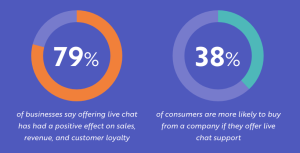
Live chat helps by:
- Addressing objections instantly
- Clarifying doubts during checkout
- Offering timely reassurance
A simple “Can I help you with anything?” message at the checkout stage can make the difference between a lost sale and a completed purchase.
3. Builds Trust and Human Connection
Customers are more likely to buy from brands they trust. Live chat adds a human element to your website, making your business feel approachable and responsive.
It allows you to:
- Personalize interactions
- Use a conversational tone
- Show empathy and understanding
Even automated chatbots, when used well, can create a sense of attentiveness. And when human agents step in, it reinforces credibility and professionalism.
4. Increases Conversion Rates
Live chat doesn’t just support customers—it actively drives sales.
When visitors receive timely help, they’re more likely to:
- Stay longer on your site
- Explore more products or services
- Make confident purchasing decisions
By guiding users through their journey, live chat acts like a digital sales assistant—one that’s always available.
5. Offers Proactive Engagement
Unlike traditional support channels, live chat allows you to initiate conversations, not just respond to them.
For example, you can:
- Trigger messages based on user behavior
- Reach out to visitors who linger on key pages
- Offer help when someone seems stuck
This proactive approach shows customers you care and can gently nudge them toward taking action.
6. Collects Valuable Customer Insights
Every chat interaction is a goldmine of information. By analyzing conversations, you can uncover:
- Common customer questions
- Pain points in your sales process
- Feedback on products or services
These insights help you refine your website, improve your offerings, and create a better overall experience.
7. Supports Multitasking and Efficiency
From a business perspective, live chat is highly efficient. Unlike phone support, agents can handle multiple conversations at once.
This leads to:
- Reduced operational costs
- Faster response times
- Better resource allocation
For customers, it means quicker help. For businesses, it means scalable support without compromising quality.

Step-by-Step Guide: How to Implement Live Chat on Your Website
Adding live chat isn’t complicated, but doing it right requires a thoughtful approach. Here’s how to get started:
Step 1: Choose the Right Live Chat Tool
Look for a platform that fits your needs and budget. Key features to consider:
- Real-time messaging
- Chatbot automation
- Integration with your website or CRM
- Mobile responsiveness
Start simple, then scale as your needs grow.
Step 2: Define Your Goals
Before going live, be clear about what you want to achieve. For example:
- Increase conversions
- Improve customer support response times
- Capture more leads
Your goals will shape how you use live chat and measure success.
Step 3: Set Up Chat Triggers
Don’t wait for users to reach out—engage them proactively.
Create triggers such as:
- Time spent on a page
- Exit intent
- Visiting key pages (like pricing or checkout)
Keep messages friendly and non-intrusive.
Step 4: Train Your Team (or Configure Your Bot)
If you’re using human agents:
- Train them to be concise, helpful, and personable
- Provide scripts for common scenarios
If you’re using chatbots:
- Set up clear flows for FAQs
- Ensure smooth handoff to human support when needed
Step 5: Optimize for User Experience
Make sure your live chat enhances—not disrupts—the browsing experience:
- Place the chat widget in an accessible but unobtrusive spot
- Use clear, welcoming language
- Avoid overly aggressive pop-ups
Step 6: Monitor and Improve
Track performance metrics like:
- Response time
- Customer satisfaction
- Conversion rates
Use this data to refine your approach and continuously improve results.
FAQs About Live Chat
1. Is live chat suitable for small businesses?
Absolutely. Live chat is one of the most cost-effective ways for small businesses to provide excellent customer support and compete with larger companies.
2. Should I use a chatbot or a human agent?
Ideally, both. Chatbots can handle simple queries and provide instant responses, while human agents can step in for more complex or sensitive issues.
3. Will live chat annoy my website visitors?
Not if implemented correctly. Keep messages helpful and relevant, and avoid being overly intrusive. A well-timed, polite message can enhance the experience rather than disrupt it.
4. How quickly should I respond to chat messages?
As quickly as possible. Customers expect near-instant responses—ideally within seconds. If that’s not feasible, use automated replies to acknowledge their message.
5. Can live chat really increase sales?
Yes. By removing friction, answering questions in real time, and guiding customers through the buying process, live chat can significantly boost conversion rates.
6. What industries benefit most from live chat?
Almost every industry can benefit, including:
- E-commerce
- SaaS
- Healthcare
- Finance
- Education
Any business that interacts with customers online can use live chat effectively.
Final Thoughts
Live chat is more than just a support tool—it’s a strategic asset that enhances customer experience and drives revenue. By offering instant assistance, building trust, and guiding users through their journey, it creates a smoother, more engaging path to purchase.
If you’re looking for a practical way to improve both customer satisfaction and sales performance, implementing live chat is a smart move. Start small, stay consistent, and refine your approach over time—you’ll likely see the impact sooner than you expect.


