How Chatbots Are Changing Business Websites
A business website is no longer just an online brochure. Today, customers expect websites to answer questions, provide useful information, and help them take action—often without waiting for a sales representative or customer service agent.
That is where chatbots come in.
How Chatbots Are Changing Business Websites is more than a technology trend. Chatbots are changing the way businesses communicate with visitors, generate leads, provide customer support, and create personalized online experiences.
From answering frequently asked questions to helping customers choose products, modern chatbots can make a website more interactive and useful. When implemented correctly, they can also save businesses time while improving the customer experience.
In this guide, we’ll explore how chatbots are transforming business websites, their key benefits, and a step-by-step approach to adding one to your site.
What Is a Website Chatbot?
A chatbot is a software tool that communicates with website visitors through a conversational interface. It can respond to questions, provide information, guide visitors to specific pages, collect contact details, and sometimes complete actions such as booking appointments or recommending products.
Traditional chatbots typically relied on predefined rules and keywords. Modern AI-powered chatbots can understand natural language and respond more flexibly, making conversations feel more natural.
For example, instead of searching through several pages for information about delivery, a visitor could simply ask:
“How long does shipping take?”
The chatbot could immediately provide the relevant information and direct the visitor to the shipping policy if they want more details.
How Chatbots Are Changing Business Websites
1. Providing Instant Customer Support
One of the biggest advantages of chatbots is their ability to provide immediate assistance.
Customers don’t always want to search through an FAQ page or wait for an email response. A chatbot can answer common questions at any time, including outside normal business hours.
For example, a business chatbot might answer questions about:
- Opening hours
- Pricing
- Shipping and delivery
- Returns and refunds
- Services
- Appointment availability
- Product specifications
- Contact information
This can make a website feel more responsive while reducing the number of repetitive questions handled manually by customer service teams.
2. Improving Lead Generation

Getting visitors to your website is only part of the challenge. Businesses also need to turn visitors into leads.
Chatbots can help by starting conversations with potential customers at the right moment.
Instead of relying only on a static “Contact Us” form, a chatbot can ask simple questions such as:
“Are you looking for pricing, a demo, or more information?”
Based on the visitor’s response, the chatbot can guide them toward the appropriate next step.
It can also collect information such as a name, email address, company, or project requirements—provided the business handles personal data responsibly.
3. Creating More Personalized Experiences
Modern customers expect relevant experiences.
A chatbot can use information provided during a conversation to personalize its responses. For example, an online clothing store could ask a visitor what type of product they’re looking for, their preferred style, and their budget.
The chatbot could then suggest relevant categories or products.
This is particularly useful for businesses with large websites where visitors may otherwise struggle to find exactly what they need.
4. Helping Visitors Navigate Websites
Large websites can contain hundreds or even thousands of pages. Even a well-designed navigation menu may not make everything easy to find.
Chatbots can act as conversational guides.
A visitor could ask:
“Where can I find information about your business insurance plans?”
Instead of navigating through multiple menus, the chatbot can direct the visitor to the appropriate page.
This can reduce friction and help users find information faster.
5. Supporting Sales Teams
Chatbots aren’t only useful for customer support. They can also become a valuable sales tool.
A chatbot can identify visitors who may be interested in purchasing a product or service and ask qualifying questions before passing the conversation to a sales representative.
For example:
- What service are you interested in?
- What size is your business?
- When are you looking to get started?
- Would you like to speak with someone from our team?
This helps sales teams focus their attention on qualified prospects rather than manually responding to every initial inquiry.
A Step-by-Step Guide to Adding a Chatbot to Your Business Website
Adding a chatbot doesn’t have to mean launching an expensive or complicated project. Here’s a practical approach.
Step 1: Define Your Goal
Before choosing a chatbot platform, decide what you want the chatbot to accomplish.
Possible goals include:
- Answering customer questions
- Generating leads
- Booking appointments
- Recommending products
- Supporting existing customers
- Helping visitors navigate the website
- Reducing customer service workload
Start with one or two clear objectives rather than trying to make the chatbot do everything.
Step 2: Identify Your Customers’ Common Questions
Review customer service emails, support tickets, sales conversations, website searches, and FAQs.
Look for recurring questions.
For example, if customers frequently ask about pricing, delivery times, or service availability, these should become some of the chatbot’s first knowledge areas.
This approach ensures you’re solving real customer problems rather than adding a chatbot simply because it is popular.
Step 3: Choose the Right Type of Chatbot
Not every business needs the same technology.
A simple rule-based chatbot may be sufficient for answering basic questions and directing visitors to specific pages.
An AI-powered chatbot may be more appropriate if you want visitors to ask questions naturally and receive answers based on a larger knowledge base.
Consider factors such as:
- Your budget
- Website size
- Customer expectations
- Required integrations
- Data privacy requirements
- Human handoff capabilities
- Reporting and analytics
Step 4: Build a Useful Knowledge Base
A chatbot is only as useful as the information behind it.
Give it access to accurate, up-to-date information about your business. Depending on the system, this could include website content, FAQs, product information, policies, and support documentation.
Keep the information organized and review it regularly.
Outdated chatbot answers can quickly damage customer trust.
Step 5: Create a Human Handoff
A chatbot shouldn’t try to handle every situation.
Some questions require a real person, particularly when they involve complex problems, complaints, sensitive information, or high-value purchases.
Make it easy for visitors to connect with a human representative.
A simple option such as “Would you like to speak with our team?” can prevent frustrating conversations.
Step 6: Test Before Launching
Test the chatbot from the perspective of a real customer.
Ask common questions, unusual questions, and questions that could potentially confuse it.
Check whether it:
- Understands natural language
- Provides accurate answers
- Links to the correct pages
- Avoids making unsupported claims
- Escalates complex issues appropriately
- Works properly on mobile devices
Testing is essential because even a technically impressive chatbot can create a poor experience if its responses aren’t useful.
Step 7: Monitor and Improve
Launching your chatbot is not the final step.
Review conversations and analytics to discover where visitors are getting stuck.
Look for unanswered questions, repeated requests for human assistance, and conversations that end without a useful outcome.
Use those insights to improve your chatbot’s knowledge and conversation flows over time.
Best Practices for Business Website Chatbots
A chatbot should make your website easier to use—not more complicated.
Keep conversations simple
Don’t overwhelm visitors with long messages. Give them clear answers and useful next steps.
Be transparent
Let visitors know when they’re interacting with an AI system. Transparency can help set appropriate expectations.
Don’t pretend to be human
A chatbot doesn’t need to imitate a person. Its value comes from being helpful, fast, and easy to use.
Prioritize accuracy
A confident but incorrect answer can be worse than no answer at all. Make sure your chatbot has reliable information and clear boundaries.
Make human support accessible
Always provide an appropriate path to human assistance when the chatbot can’t resolve an issue.
Design for mobile
A significant portion of website traffic comes from mobile devices. Make sure the chatbot doesn’t cover important content or make navigation difficult on smaller screens.
The SEO Impact of Chatbots
Chatbots can indirectly support your SEO strategy, but they aren’t a replacement for strong website content.
For example, conversations can reveal the questions customers commonly ask. Those questions can inspire useful blog posts, FAQ pages, product guides, and service content.
However, businesses should avoid hiding important information exclusively inside a chatbot.
Search engines need crawlable website content to understand what your business offers. Important information should remain available through normal website pages as well.
The best approach is to use chatbots as an additional layer of assistance rather than replacing your site’s content strategy.
Frequently Asked Questions
Are chatbots good for small businesses?
Yes. Small businesses can benefit from chatbots when they have repetitive customer questions or limited customer support resources. A simple chatbot can provide basic assistance while allowing employees to focus on more complex tasks.
Can chatbots increase website conversions?
They can. By answering questions, recommending next steps, and helping visitors find relevant information, chatbots can reduce friction during the buying journey. Results will depend on the business, website, audience, and chatbot implementation.
Do customers prefer chatbots over humans?
Not always. Customers often appreciate chatbots for quick, straightforward questions but may prefer human support for complicated or sensitive issues. Providing both options is usually the strongest approach.
Are AI chatbots expensive?
Costs vary considerably depending on the technology, number of conversations, integrations, and features required. Businesses can start with a relatively simple solution and expand it as their needs grow.
Can a chatbot replace customer service employees?
In most cases, it is better to think of a chatbot as a support tool rather than a complete replacement for customer service employees. Chatbots can handle repetitive tasks while human employees manage situations requiring judgment, empathy, or expertise.
Will chatbots hurt my website’s SEO?
A chatbot itself doesn’t automatically hurt SEO. However, businesses shouldn’t put essential information only inside a chatbot. Maintain high-quality, accessible website content and use the chatbot to enhance the visitor experience.
The Future of Business Websites Is Conversational
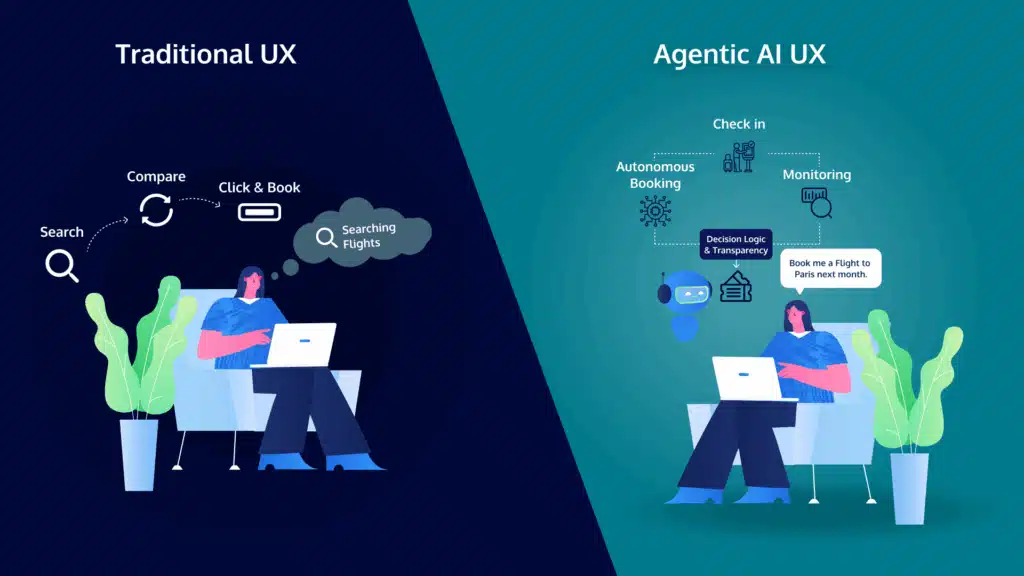
The traditional business website is evolving.
Instead of simply displaying information, websites are becoming interactive platforms where customers can ask questions, receive recommendations, get support, and take action.
That’s why understanding how chatbots are changing business websites is becoming increasingly important for businesses of all sizes.
The key isn’t to add a chatbot simply because the technology is available. The goal is to solve genuine customer problems.
Start with common questions. Give visitors useful answers. Make it easy to reach a human when necessary. Monitor conversations and continuously improve the experience.
When thoughtfully implemented, a chatbot can turn a static website into a more responsive, helpful, and customer-focused digital experience.