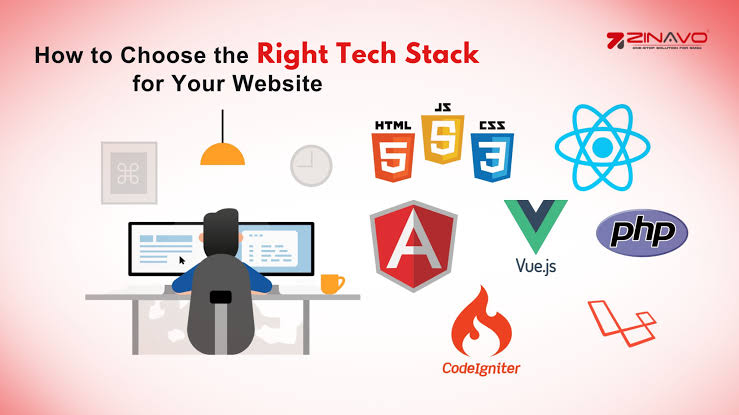
How to Choose the Right Tech Stack for Your Website
Building a website is an exciting milestone, whether you’re launching a personal blog, an online store, a portfolio, or a business platform. However, before you dive into design or development, one of the most important decisions you’ll make is selecting the right technology stack.
If you’ve ever wondered how to choose the right tech stack for your website, you’re not alone. With countless programming languages, frameworks, databases, hosting providers, and development tools available today, making the right choice can feel overwhelming.
The good news is that there’s no one-size-fits-all solution. The ideal tech stack depends on your goals, budget, scalability needs, and the type of experience you want to deliver to your users.
In this guide, you’ll learn what a tech stack is, why it matters, and a practical step-by-step process for choosing the best one for your website.
What Is a Tech Stack?
A tech stack is the collection of technologies used to build and operate a website or web application. It typically consists of two main parts:
Frontend (Client Side)
- HTML
- CSS
- JavaScript
- Frameworks like React, Vue, or Angular
Backend (Server Side)
- Programming languages such as Python, JavaScript (Node.js), PHP, Java, Ruby, or C#
- Frameworks like Django, Laravel, Express.js, or ASP.NET
- Databases such as MySQL, PostgreSQL, or MongoDB
Additional components may include:
- Cloud hosting
- Content Delivery Networks (CDNs)
- APIs
- Authentication services
- Analytics tools
- DevOps and deployment platforms
Together, these technologies determine how your website performs, scales, and evolves over time.
Why Choosing the Right Tech Stack Matters
The technology behind your website affects much more than development.
A well-chosen stack can help you:
- Improve website performance
- Enhance security
- Reduce development costs
- Make future updates easier
- Scale as your business grows
- Deliver a better user experience
On the other hand, choosing technologies that don’t fit your needs can lead to slower performance, expensive maintenance, and difficult migrations later.
That’s why investing time in this decision is worthwhile.

Step 1: Define Your Website Goals
Before comparing programming languages or frameworks, start with your business objectives.
Ask yourself:
- What type of website am I building?
- Who is my target audience?
- What features are essential?
- Will users create accounts?
- Will I sell products online?
- Will the website require real-time functionality?
Different projects require different technologies.
For example:
- A portfolio website has very different requirements than an online marketplace.
- A company website doesn’t need the same infrastructure as a social media platform.
- An e-commerce store requires secure payment integration and inventory management.
Your goals should guide every technology decision.
Step 2: Understand Your Budget
Budget plays a major role in choosing the right tech stack for your website.
Development costs include:
- Initial development
- Hosting
- Third-party services
- Maintenance
- Security updates
- Future enhancements
Open-source technologies can significantly reduce licensing costs.
For startups and small businesses, popular open-source stacks often provide everything needed without expensive software licenses.
Remember that the cheapest option today isn’t always the least expensive in the long run. Choosing reliable, maintainable technologies often saves money over time.
Step 3: Consider Scalability
Think beyond today’s requirements.
Ask questions like:
- Will website traffic grow?
- Will you add new features later?
- Could your business expand internationally?
- Will thousands of users visit simultaneously?
A scalable technology stack allows your website to grow without requiring a complete rebuild.
Cloud-native solutions and modular architectures often make scaling easier as your audience expands.
Planning for growth now can prevent expensive redesigns later.
Step 4: Evaluate Performance Requirements
Website speed influences both ideal technologyit’s the one that aligns with your goals and supports your website as it grows. By planning carefully and prioritizing flexibility, you’lluited for businesses that expect growth user satisfaction and search engine rankings.
When evaluating technologies, consider:
- Page load speed
- Server response time
- Database efficiency
- Image optimization
- Caching capabilities
Some websites require lightning-fast performance.
Examples include:
- Online stores
- News websites
- Booking platforms
- SaaS applications
Choosing technologies known for performance can improve user engagement and conversion rates.
Step 5: Think About Security
Cybersecurity should never be an afterthought.
Every website handles valuable information, whether it’s customer data, login credentials, or payment details.
When evaluating your tech stack, consider:
- Security updates
- Community support
- Authentication options
- Data encryption
- Vulnerability management
Well-maintained frameworks receive frequent security patches, making them safer choices.
Security is not only about technology—it also depends on development best practices.
Step 6: Choose the Right Frontend Technology
The frontend is everything visitors see and interact with.
For simple websites, standard HTML, CSS, and JavaScript may be sufficient.
For interactive websites, modern frameworks provide additional capabilities.
Popular frontend options include:
React
- Excellent ecosystem
- Fast rendering
- Large community
- Ideal for dynamic applications
Vue
- Beginner-friendly
- Lightweight
- Flexible
- Easy integration
Angular
- Enterprise-ready
- Comprehensive features
- Strong architecture
- Suitable for complex applications
The best choice depends on project complexity and developer experience.
Step 7: Select a Backend That Matches Your Needs
The backend powers your website behind the scenes.
It manages:
- Databases
- User authentication
- APIs
- Business logic
- Payments
- Content management
Popular backend technologies include:
Node.js
Ideal for:
- Real-time applications
- Chat systems
- APIs
- Fast development
Python
Excellent for:
- AI projects
- Data-driven applications
- Automation
- Rapid development
PHP
A solid choice for:
- Content management systems
- Business websites
- WordPress projects
Java
Commonly used for:
- Large enterprise applications
- Financial systems
- High-performance platforms
C# and ASP.NET
Popular among:
- Microsoft-focused businesses
- Enterprise environments
- Internal business applications
Each language has strengths depending on your project’s goals.
Step 8: Pick the Right Database
The database stores your website’s information.
The two major categories are:
SQL Databases
Examples include:
- MySQL
- PostgreSQL
Best for:
- Structured data
- Financial systems
- E-commerce
- Inventory management
NoSQL Databases
Examples include:
- MongoDB
- Cassandra
Best for:
- Flexible data
- Large-scale applications
- Real-time platforms
- Rapid growth
The right database depends on how your data is organized and accessed.
Step 9: Consider Hosting and Infrastructure
Your hosting environment should support your chosen technologies.
Popular options include:
- Shared hosting
- Virtual private servers (VPS)
- Dedicated servers
- Cloud hosting
Cloud platforms are particularly attractive because they offer:
- Automatic scaling
- High availability
- Strong security
- Global infrastructure
- Flexible pricing
Reliable hosting contributes significantly to website performance and uptime.
Step 10: Think About Long-Term Maintenance
Your website will continue evolving after launch.
Ask questions like:
- Is the technology actively maintained?
- Is there good documentation?
- Can developers easily learn it?
- Are updates released regularly?
- Is there strong community support?
Choosing widely adopted technologies makes hiring developers and maintaining your website much easier.
Long-term sustainability should always be part of your decision.
Common Tech Stack Examples
While every project is unique, here are some popular combinations.
Business Website
- HTML
- CSS
- JavaScript
- PHP
- MySQL
WordPress Website
- PHP
- MySQL
- Apache or Nginx
SaaS Platform
- React
- Node.js
- PostgreSQL
- Cloud hosting
E-commerce Website
- React
- Node.js
- MongoDB
- Payment gateway integration
Content Platform
- Next.js
- Node.js
- PostgreSQL
- CDN
- Cloud storage
These are starting points rather than strict rules.
Common Mistakes to Avoid
Many website owners make avoidable mistakes when selecting a technology stack.
These include:
- Choosing trendy technologies without understanding them
- Ignoring scalability
- Overcomplicating small projects
- Underestimating security
- Focusing only on short-term costs
- Forgetting future maintenance
- Not considering developer availability
A balanced decision usually delivers the best long-term results.
Final Thoughts
Learning how to choose the right tech stack for your website is about understanding your project’s unique needs rather than following trends.
The ideal technology stack balances performance, security, scalability, budget, and long-term maintainability. Whether you’re creating a simple business website or a sophisticated web application, taking time to evaluate your options can save countless hours and expenses in the future.
Remember, the best tech stack isn’t necessarily the newest or most popular—it’s the one that aligns with your goals and supports your website as it grows. By planning carefully and prioritizing flexibility, you’ll build a strong foundation for lasting online success.
Frequently Asked Questions (FAQs)
1. What is the best tech stack for a website?
There isn’t a single best option. The right tech stack depends on your website’s purpose, expected traffic, required features, budget, and long-term goals.
2. Is WordPress considered a tech stack?
Yes. WordPress relies on PHP, MySQL, HTML, CSS, and JavaScript, making it a complete technology ecosystem for many websites.
3. Which frontend framework should I choose?
React is a popular choice for dynamic applications, Vue is known for its simplicity, and Angular is often preferred for large-scale enterprise projects. The best choice depends on your team’s expertise and project complexity.
4. Should startups use cloud hosting?
In many cases, yes. Cloud hosting offers flexibility, scalability, and pay-as-you-go pricing, making it well-suited for businesses that expect growth.
5. How often should I update my website’s tech stack?
You don’t need to replace your entire stack regularly, but you should keep frameworks, libraries, and software updated with the latest security patches and performance improvements. Review your technology choices periodically to ensure they continue meeting your business needs.
If you’d like, I can also tailor this article for higher-ranking SEO by adding a meta title, meta description, suggested URL slug, internal linking ideas, and FAQ schema markup.