AI-powered personalization used to be something only Amazon and Netflix could afford. In 2026, a plumber in Geelong can show a returning visitor a different call to action from the one a first-timer sees, and a booking assistant can lock in a job while the owner is up a ladder.
I look at a lot of small business websites as a senior SEO specialist, and the pattern is pretty consistent. Owners hear about generative UI and AI agents, assume it’s all enterprise money, then either ignore it or buy something expensive they don’t need. Neither ends well.
So here’s the practical version. You’ll see what personalization and agentic UX actually mean, which ideas are worth trying on a small budget, how to keep Google happy, and what the Australian privacy rules say before you switch anything on.
What Is AI-Powered Personalization on a Website?
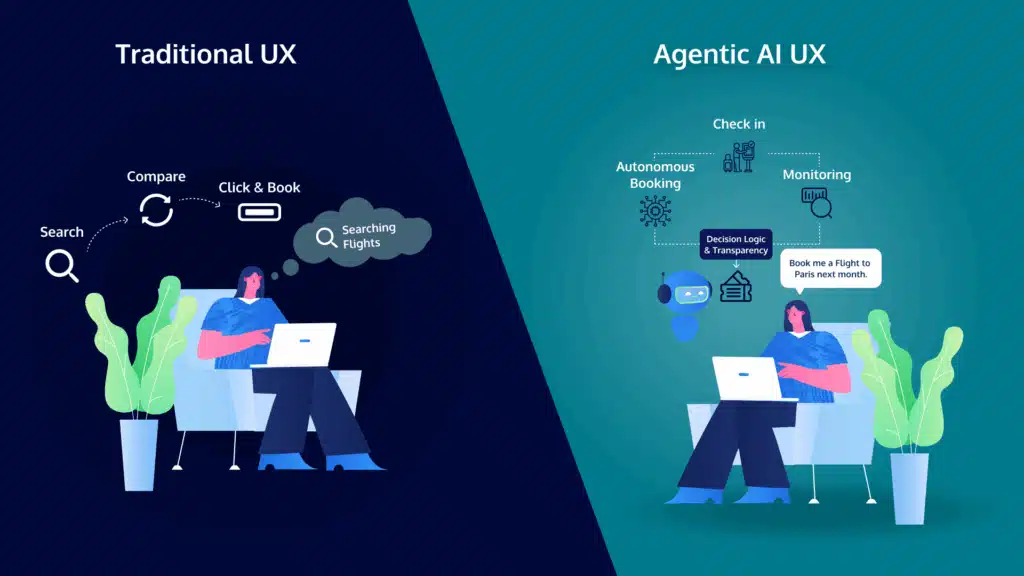
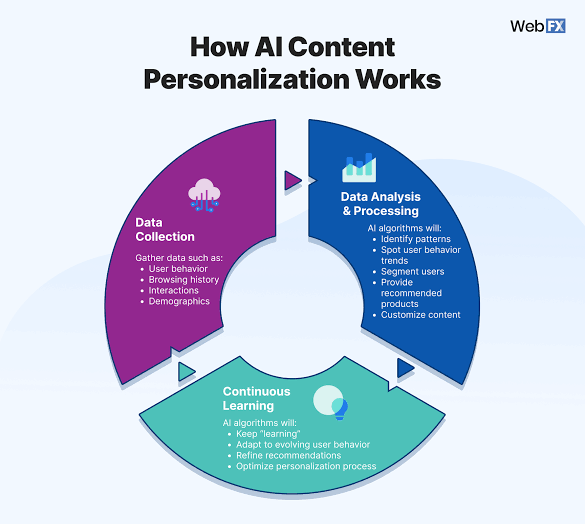
AI-powered personalization means your website changes its content, layout, offers or recommendations for each visitor, using signals such as location, device, referral source and past visits. Instead of one page for everyone, people see the version most likely to help them take the next step.
It sits on a spectrum. At one end are simple rules you set yourself: show Perth visitors a Perth phone number, or show returning customers a booking button instead of a newsletter box. At the other end, machine learning watches thousands of visits and works out which headline or offer suits which type of visitor. We flagged this direction in our predictions for websites in 2030, and it has arrived faster than most of us expected.
My advice for most small businesses is to start at the rules end. It’s cheaper, it’s easier to explain to customers, and you’ll learn what your audience responds to before handing decisions to an algorithm.
What Is Agentic UX and Why Should Small Businesses Care?
Agentic UX is a design approach where an AI agent takes actions for the user, such as booking a time, comparing quotes or completing a purchase, rather than just displaying information. For a small business it shows up in two ways: agents you put on your own site, and agents your customers bring with them. It tends to arrive alongside AI-powered personalization, because both rely on the same signals.
The first kind goes a step past the chatbot. A chatbot answers questions, which we covered in how chatbots are changing business websites. An agent can check your calendar, offer a time and confirm the job. The second kind is newer and a bit odd. A customer asks their assistant to find a local electrician free on Thursday, and the assistant reads your site instead of the customer. If your pricing is vague or your booking form is a maze, it simply moves on to a competitor.
I wouldn’t panic about that yet. But it does change what a good site looks like. A site that’s clear, well structured and quick for software to read tends to be clear and quick for people as well.
What Is Generative UI?
Generative UI is an interface assembled on the fly by AI, so the layout itself changes for each visitor rather than just the text. It’s the flashiest part of this trend and, for now, the least useful to a small business. Most of the real gains come from simpler moves, like changing a headline, a button or the order of your products.
Does AI-Powered Personalization Actually Improve Conversions?
It can, but the size of the lift varies a lot, so be wary of big headline numbers. McKinsey’s 2021 research found that 71 percent of consumers expect personalized interactions, and that faster-growing companies earn about 40 percent more of their revenue from personalization than slower-growing ones.
That tells you what customers expect. It doesn’t promise your site will convert better next month. You’ll also stumble on articles claiming personalization lifts conversions by 80 percent or more. Those figures usually come from vendors, and they rarely say what the starting point was.
A better plan is to measure your own baseline first. Use the numbers we walked through in the website metrics worth tracking, such as enquiry rate, bounce rate and cost per lead. Then change one thing at a time and see what moves.
How Can a Small Business Start With AI-Powered Personalization?
Start with changes that are cheap to test and easy to reverse. These seven suit a typical small business site.
Why Match Your Headline to the Traffic Source?
Because people arriving from different places want different things. Someone searching for an emergency plumber wants a phone number, while someone from a Facebook post may want a short story first. Swapping the headline and first button for each source is simple, and it’s the same thinking behind good landing page design.
How Does Location-Based Content Help?
It builds trust quickly. A visitor in Brisbane sees Brisbane suburbs, reviews and a local number, which matters most if you serve more than one city.
Should Returning Visitors See Something Different?
Yes. A first-timer needs reassurance like reviews and a rough price range, while someone on their third visit probably just needs a booking button.
Can You Recommend Products or Services Automatically?
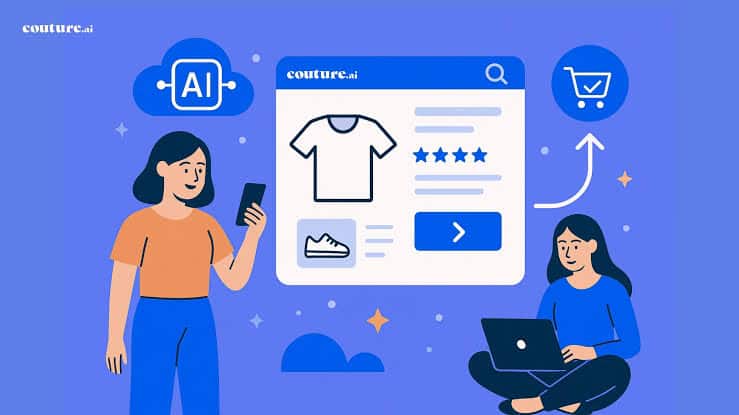
Yes, and it’s the best-proven form of personalization for shops. Related products and recently viewed lists are the classic examples, and if you sell online, your eCommerce website design should include them from day one.
Should Your Call to Action Change by Time of Day?
It’s worth testing. Offer a call now button during opening hours and a short enquiry form after hours, so late-night visitors never hit a dead end.
Can Smarter Forms Lift Enquiries?
Often, yes. If you already know who someone is, don’t make them retype it. Forms that skip fields or suggest the likely service cut effort, and less effort means more finished enquiries.
Can AI Run the Tests for You?
Yes, with the right tool and enough traffic. Webflow Optimize, for example, can try several headline and button versions and shift visitors towards whichever performs best. Third-party reviews list entry plans from roughly US$299 a month, so check current pricing first.
If you only try one of these this month, make it the first. Headlines matched to traffic sources need no extra software, they are easy to measure, and they will tell you quickly whether your visitors respond to a more tailored message.
What Tools Can Small Businesses Use?
You don’t need an enterprise platform to try this. Depending on how your site is built, there are three practical routes.
- Page builder rules. Many page builders, including Elementor Pro, let you show or hide sections based on simple conditions such as device, page or login status. That’s enough for most of the ideas above.
- Testing and personalization platforms. Webflow Optimize combines A/B testing, audience rules and AI-driven optimization, and non-Webflow sites can add it with a small script. It suits businesses with real traffic.
- AI design and code assistants. Design tools such as Figma now ship AI features, and coding assistants can draft page variations in minutes. They save time, but a person still needs to check accuracy, accessibility and brand fit.
For a wider look at what’s worth paying for, see our rundown of the best AI tools for growing website traffic.
How Do You Get Your Website Ready for AI Agents?
Make your site easy for software to read and act on. That means clear text, structured data, upfront pricing and a booking flow that doesn’t rely on guesswork.
- Say what you do, where you do it and roughly what it costs in plain text, not buried in images or PDFs.
- Add structured data for your business, services, reviews and FAQs so software can understand your pages without guessing.
- Keep your name, address, phone number and opening hours identical everywhere they appear.
- Keep forms and booking steps short. Heavy CAPTCHAs and cluttered layouts trip up people and software alike.
- Get the basics of website accessibility right. Clean headings, descriptive links and proper form labels tend to help both assistive technology and AI agents.
Will AI-Powered Personalization Hurt My SEO?
Not if the main content stays the same for everyone, including Googlebot. Trouble starts when search engines see one thing and visitors see something materially different, which Google treats as cloaking.
Keep your core copy, headings and key facts consistent, and personalize the supporting pieces: banners, buttons, recommendations and local details. Use the URL Inspection tool in Search Console to check what Google actually sees, and watch page speed, because heavy scripts can slow a site down. It’s the kind of thing we look at in our search engine optimization work.
What Do Australian Privacy Rules Mean for AI-Powered Personalization?
It depends on your size and what you do with visitor data, but plan for transparency either way. The Privacy Act 1988 generally covers businesses with an annual turnover above $3 million, plus some smaller ones, such as health service providers and businesses that trade in personal information.
If you’re covered, there’s a date to remember. From 10 December 2026, a business that uses a computer program to make, or substantially help make, a decision that could significantly affect someone’s rights or interests must explain that in its privacy policy. The OAIC’s APP 1 guidelines point to tailored pricing for significant goods or services as one example that could qualify.
Swapping a banner or reordering products is very unlikely to meet that threshold. Charging different people different prices, or screening who gets access to a service, is a different story. I’m an SEO specialist, not a lawyer, so check your own position with the OAIC guidance or your legal adviser. Whatever your size, keep your privacy policy accurate, say plainly what your site collects and why, and don’t use sensitive details such as health information to tailor what people see.
Frequently Asked Questions
What is AI-powered personalization in simple terms?
It’s your website changing what it shows each visitor, such as the headline, offer or recommended products, based on signals like location, device and past visits. AI helps decide which version suits which person, so you don’t have to set every rule by hand.
What is the difference between personalization and agentic UX?
Personalization changes what someone sees. Agentic UX lets an AI agent do something for them, like booking a time or placing an order. They work well together: personalization points people to the right option, and an agent completes the task.
Is AI-powered personalization too expensive for a small business?
Not if you start small. Rules built into your page builder cost little beyond setup time, while dedicated AI platforms are priced for bigger traffic volumes. Our website design team can scope what suits your budget.
How much traffic do I need before I try it?
Enough for a test to show a clear winner. If your site gets only a few hundred visits a month, stick to common-sense rules, because there isn’t enough data for an AI tool to learn from.
Can personalization get my website in trouble with Google?
Only if search engines are shown substantially different content from what visitors see, which is cloaking. Personalizing banners, buttons and recommendations while keeping your core content the same is fine.
Do Australian privacy laws apply to my website personalization?
They might. The Privacy Act mostly covers businesses with turnover above $3 million plus certain smaller ones, and new disclosure rules for automated decisions start on 10 December 2026. Check your obligations and keep your privacy policy accurate.
Ready to Try AI-Powered Personalization on Your Website?
You don’t need a big budget or a full rebuild. Pick one page, one audience and one change, then measure what happens. If you’d like a second opinion on where personalization could help your site, or you want it built properly with the SEO and privacy basics covered, contact the Diverse Website Design team and we’ll point you to the best first step.