Internal Linking for Large Websites: A Scalable Approach
Managing internal links on a five-page website is easy. Managing them on a 5,000-page website? That’s a completely different challenge.
As websites grow, content expands across categories, subcategories, blog posts, product pages, landing pages, resources, and more. Without a structured internal linking system, even high-quality content can become buried, underperforming, or completely invisible to search engines.
That’s where a scalable internal linking strategy becomes essential.
In this guide, we’ll walk through a practical, step-by-step framework to implement internal linking for large websites in a way that improves SEO, enhances user experience, and stays manageable as your site continues to grow.
Why Internal Linking Matters More for Large Websites
On large websites, internal linking directly impacts:
-
Crawlability – Search engines need pathways to discover and index your pages.
-
Indexation – Pages without internal links may never get indexed.
-
Link equity distribution – Authority flows through internal links.
-
User experience – Clear pathways reduce friction and improve engagement.
-
Topical authority – Structured linking reinforces subject relevance.
When internal linking is inconsistent or random, you’ll likely encounter:
-
Orphan pages
-
Deep pages that are 5+ clicks from the homepage
-
Keyword cannibalization
-
Poor rankings despite strong content
The solution isn’t adding more links randomly. It’s building a scalable system.
A Scalable Approach to Internal Linking
Below is a structured, repeatable process designed specifically for large websites.
Step 1: Audit Your Current Internal Link Structure
Before building anything new, you need clarity.
What to Analyze:
-
Pages with zero internal links (orphan pages)
-
Pages with too few inbound links
-
Pages buried too deep in site architecture
-
Over-linked pages (often homepage, category pages)
-
Broken internal links
-
Anchor text patterns
Recommended Tools:
-
Screaming Frog – Full crawl analysis
-
Ahrefs – Internal link report
-
Google Search Console – Indexing & performance insights
The goal isn’t perfection—it’s identifying structural weaknesses.
Step 2: Define a Clear Site Architecture
Large websites need structure before links.
The two most effective models:
1. Silo Structure
-
Homepage
→ Category
→ Subcategory
→ Individual pages
Each section links primarily within itself.
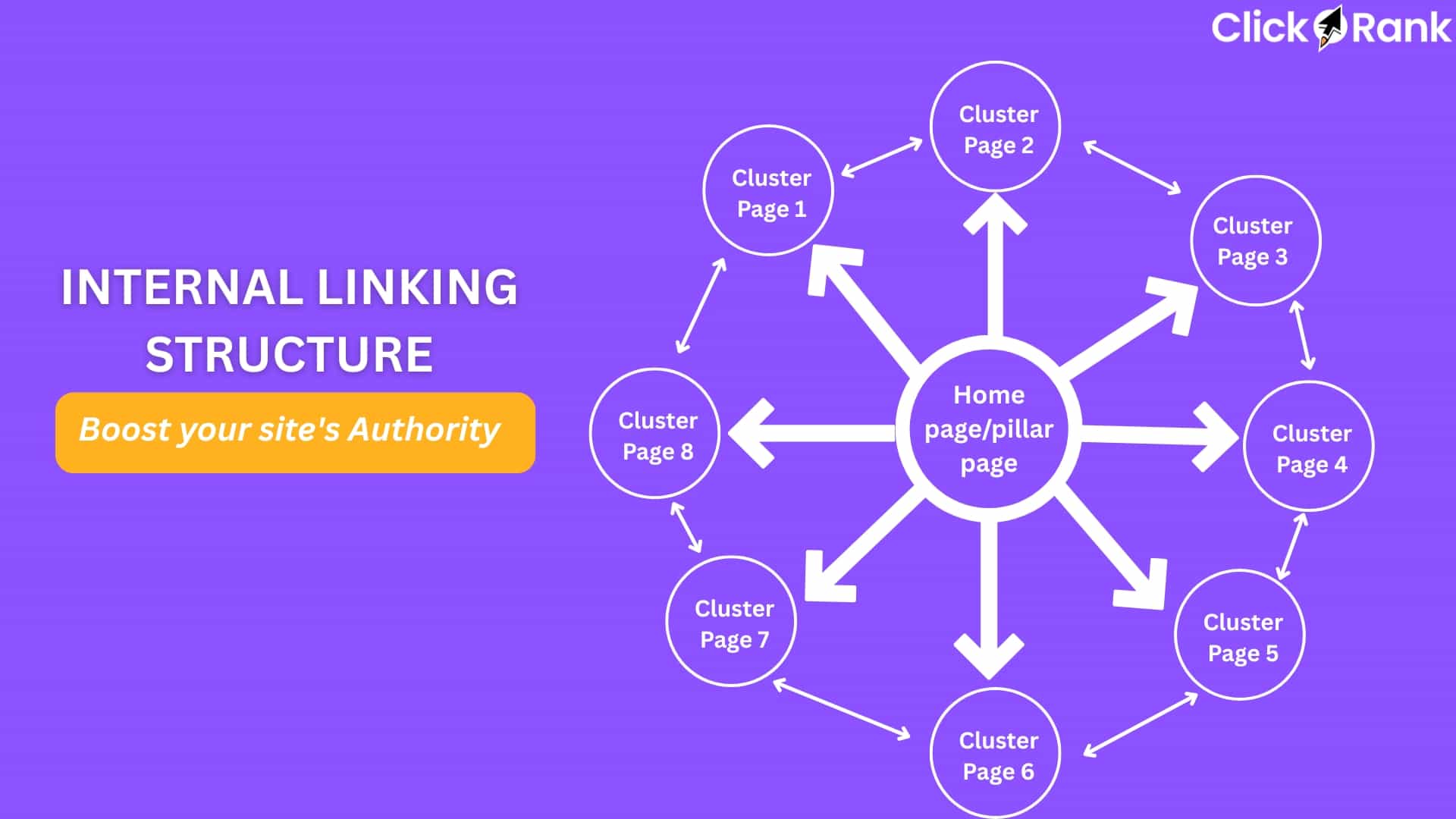
2. Topic Cluster Model
-
Pillar page (broad topic)
-
Supporting content (subtopics)
-
Bidirectional linking between them
For content-heavy websites, the topic cluster model is usually more scalable because it supports content expansion without breaking structure.
Pro tip: Keep important pages within 3 clicks from the homepage whenever possible.

Step 3: Create Link Rules (Your Scalability Engine)
Here’s where large websites either succeed or fail.
Instead of manually adding links randomly, define systematic linking rules.
Examples of Scalable Link Rules:
-
Every blog post must link to:
-
1 pillar page
-
2–3 related articles
-
1 relevant service/product page
-
-
Every product page must link to:
-
Parent category
-
Related products
-
Relevant buying guide
-
-
Every new page must receive at least 3 internal links within 30 days of publishing.
When rules exist, growth becomes manageable.
Step 4: Implement Contextual Internal Linking
Contextual links (within body content) carry more SEO value than footer or sidebar links.
Best Practices:
-
Use descriptive anchor text (avoid generic “click here”).
-
Keep anchor text natural.
-
Link only where contextually relevant.
-
Avoid over-optimization (don’t force exact-match anchors repeatedly).
For large websites, consistency matters more than density. A few strong contextual links outperform dozens of weak ones.
Step 5: Leverage Automation (Carefully)
Manual linking doesn’t scale across thousands of pages.
Smart Automation Options:
-
CMS auto-linking rules for specific keywords
-
“Related posts” modules based on taxonomy
-
Dynamic breadcrumbs
-
Category-based cross-linking
If you’re using WordPress, plugins can assist—but always review automated links to prevent irrelevant placements.
Automation should support your strategy, not replace editorial judgment.
Step 6: Strengthen High-Value Pages Strategically
Not all pages deserve equal link equity.

Identify:
-
High-converting landing pages
-
Pages ranking on page 2 of search results
-
Strategic content hubs
Then systematically increase internal links pointing to them from relevant high-authority pages.
This approach often produces faster ranking improvements than creating new content.
Step 7: Fix Orphan & Deep Pages
Orphan pages are common on large websites due to:
-
Seasonal campaigns
-
Old blog posts
-
Discontinued product pages
-
CMS migrations
Run quarterly crawls and:
-
Add contextual links from related pages
-
Link from category pages
-
Merge thin content when necessary
If a page isn’t worth linking to, consider pruning it.
Step 8: Monitor and Iterate
Internal linking is not a one-time task.
-
Crawl depth
-
Indexed pages
-
Internal link count per URL
-
Organic performance of linked pages
Make internal link optimization part of your ongoing SEO workflow—not just a cleanup project.
Common Mistakes in Internal Linking for Large Websites
Even experienced teams make these errors:
❌ Overlinking Navigation
Too many links in mega menus dilute authority.
❌ Ignoring Anchor Diversity
Using identical keyword-rich anchor text everywhere looks unnatural.
❌ Linking Without Relevance
Random cross-linking confuses users and search engines.
❌ Forgetting Content Updates
Old articles should be updated with links to newer content.
How Internal Linking Improves SEO at Scale
When implemented correctly, scalable internal linking:
-
Helps search engines discover new pages faster
-
Distributes authority efficiently
-
Reinforces topic relevance
-
Improves ranking potential
-
Reduces dependency on external backlinks
For large websites especially, internal linking is often the fastest SEO win available.
FAQs: Internal Linking for Large Websites
1. How many internal links should a page have?
There’s no fixed number. Focus on relevance and usability. For long-form content, 5–15 contextual links are common—but quality always outweighs quantity.
2. Can too many internal links hurt SEO?
Yes. Excessive linking dilutes authority and may look spammy. Keep links helpful and purposeful.
3. How often should I audit internal links?
For large websites, conduct a technical crawl quarterly. High-growth sites may benefit from monthly reviews.
4. Should internal links use exact-match keywords?
Use descriptive anchors naturally. Avoid repeating the same exact-match phrase across dozens of pages.
5. Are footer and sidebar links valuable?
They help with navigation, but contextual links within body content carry more SEO weight.
6. What’s the biggest internal linking mistake on large websites?
Lack of structure. Without defined link rules and architecture, growth creates chaos.
Final Thoughts: Build Systems, Not Random Links
When managing internal linking for large websites, scale is everything.
The difference between average SEO performance and exceptional performance often comes down to structure and consistency—not just content quality.