What Is Website Interlinking? A Beginner’s Guide
Website interlinking is one of those SEO fundamentals that sounds technical but is actually simple—and incredibly powerful—once you understand it. If you’ve ever clicked a link on a website that took you to another page on the same site, you’ve experienced interlinking in action.
In this beginner-friendly guide, we’ll break down what website interlinking is, why it matters for SEO and user experience, and how to do it step by step—without overcomplicating things or relying on jargon. Whether you’re running a blog, a business website, or an online store, mastering interlinking can help your content perform better and feel easier to navigate.
What Is Website Interlinking?
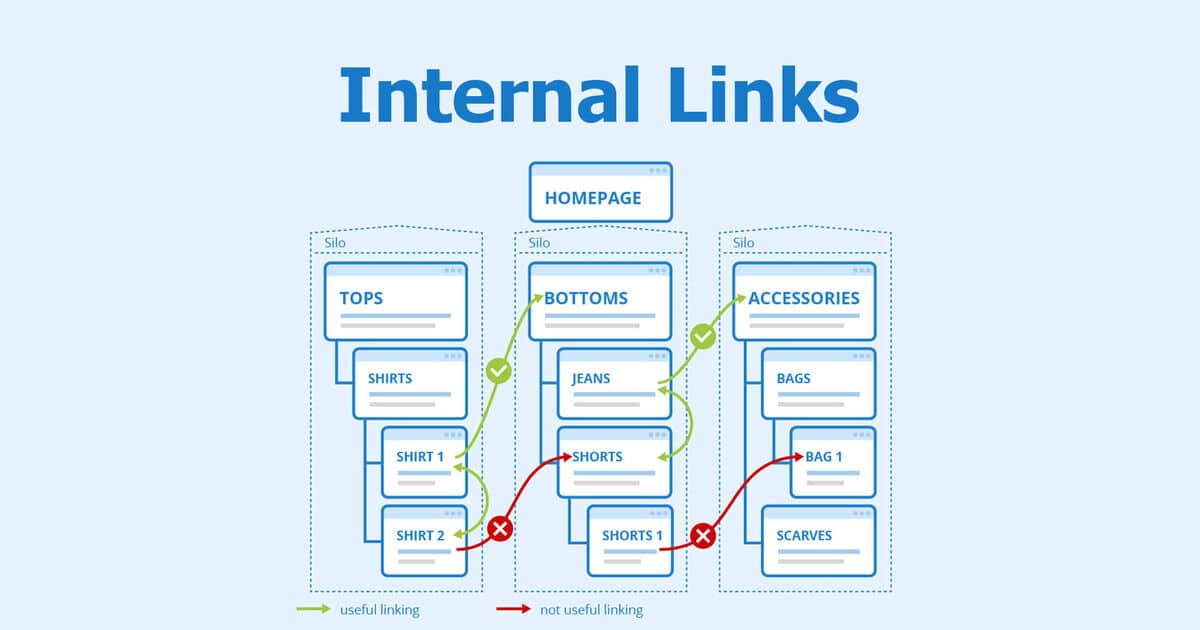
Website interlinking (also called internal linking) is the practice of linking one page of your website to another page on the same website.
For example:
-
A blog post linking to another related blog post
-
A homepage linking to a service page
-
A product page linking to a buying guide or FAQ
These links help users and search engines understand how your content is connected.
Internal Links vs. External Links
To clarify:
-
Internal links point to pages within your own website
-
External links point to pages on other websites
This guide focuses entirely on internal links, which you control and can optimize strategically.
Why Website Interlinking Matters
Website interlinking isn’t just about adding links—it plays a key role in SEO, usability, and content structure.
1. Helps Search Engines Understand Your Site
Search engines use links to:
-
Discover new pages
-
Understand relationships between content
-
Decide which pages are most important
Well-structured internal links make it easier for search engines to crawl and index your website efficiently.
2. Improves User Experience
Good interlinking:
-
Helps visitors find relevant information quickly
-
Encourages them to stay longer on your site
-
Reduces frustration and bounce rates
When users can easily navigate your content, they’re more likely to trust your site.
3. Distributes Page Authority
Some pages naturally earn more backlinks or traffic. Internal links allow you to pass some of that authority to other pages, helping them rank better in search results.
4. Supports SEO Without Feeling “Salesy”
Unlike pop-ups or aggressive CTAs, internal links guide users naturally. When done right, they feel helpful—not pushy.

Types of Website Interlinking
Understanding the different types of internal links makes it easier to use them effectively.
1. Navigational Links
These appear in:
-
Menus
-
Headers
-
Footers
They help users access your most important pages, such as About, Services, or Contact.
2. Contextual Links
These are links placed within the main content of a page—usually inside a paragraph.
They’re the most valuable for SEO because they provide context.
Example:
“If you’re new to SEO, start by learning the basics of keyword research.”
3. Footer Links
Often used for:
-
Policies
-
Secondary pages
-
Resource hubs
They’re useful but generally less powerful than contextual links.
4. Breadcrumb Links
Breadcrumbs show users where they are on a site (e.g., Home > Blog > SEO Basics).
They improve navigation and help search engines understand site structure.
Step-by-Step Guide to Website Interlinking
Now let’s get practical. Here’s a beginner-friendly process you can follow.
Step 1: Identify Your Most Important Pages
Start by listing:
-
Core service pages
-
Key blog posts
-
High-converting landing pages
These are often called pillar pages. They should receive more internal links than less important pages.
Step 2: Group Related Content
Organize your content into topics or themes.
For example:
-
SEO basics
-
Content marketing
-
Website optimization
Link related articles within the same topic to create a clear content structure.
Step 3: Use Descriptive Anchor Text
Anchor text is the clickable text of a link.
Good anchor text:
-
Clearly describes the destination page
-
Sounds natural in the sentence
Avoid:
-
“Click here”
-
“Read more”
-
Overusing the exact same keyword every time
Instead, use variations that make sense to readers.
Step 4: Add Links Naturally Within Content
Don’t force links where they don’t belong. Ask yourself:
-
Does this link help the reader?
-
Does it add context or value?
If the answer is yes, it’s probably a good link.
Step 5: Link From High-Traffic Pages
Pages that already get visitors are great places to add internal links. They can help guide traffic to newer or less visible content.
Step 6: Avoid Overloading Pages With Links
More is not always better. Too many internal links can:
-
Confuse readers
-
Dilute link value
-
Make content feel cluttered
Focus on relevance over quantity.

Step 7: Keep Links Updated
As your site grows:
-
Remove broken links
-
Update outdated references
-
Add links to new content where appropriate
Regular maintenance keeps your internal linking strategy strong.
Common Website Interlinking Mistakes to Avoid
Even beginners can avoid these with a little awareness.
Over-Optimizing Anchor Text
Using the same keyword repeatedly can look unnatural. Mix it up and prioritize readability.
Linking Only to Top Pages
Spread internal links across your site. Every valuable page deserves visibility.
Ignoring Old Content
Older posts are perfect places to add links to newer articles.
Orphan Pages
An orphan page has no internal links pointing to it. These pages are hard for users and search engines to find.
Best Practices for SEO-Friendly Interlinking
To keep your strategy effective and future-proof:
-
Link based on relevance, not convenience
-
Use clear site hierarchy
-
Keep users’ intent in mind
-
Think in topics, not isolated pages
-
Review internal links regularly
Done correctly, interlinking supports SEO without feeling manipulative or forced.
How Website Interlinking Fits Into a Bigger SEO Strategy
Website interlinking works best when combined with:
-
Quality content
-
Keyword research
-
On-page optimization
-
Technical SEO
Think of it as the glue that holds your content together. Without it, even great pages can struggle to perform.
Frequently Asked Questions (FAQs)
What is website interlinking in simple terms?
Website interlinking is linking one page of your website to another page on the same site to help users and search engines navigate your content.
Is website interlinking important for SEO?
Yes. Internal links help search engines crawl your site, understand content relationships, and distribute ranking power across pages.
How many internal links should a page have?
There’s no fixed number. Focus on relevance and usability rather than hitting a specific count.
Can too many internal links hurt SEO?
Yes. Excessive or irrelevant links can confuse users and reduce link value. Quality matters more than quantity.
What’s the difference between internal linking and backlinks?
Internal linking connects pages within your site. Backlinks are links from other websites pointing to yours.
Do internal links need to be follow links?
By default, internal links are follow links and should remain that way unless there’s a specific reason not to.
Final Thoughts
Website interlinking may seem like a small detail, but it has a big impact. When done thoughtfully, it improves navigation, strengthens SEO, and helps your content work together as a system—not as isolated pages.
If you’re just getting started, focus on being helpful. Link where it makes sense, guide your readers naturally, and build connections between related ideas. Over time, those small improvements can lead to better rankings, better engagement, and a better website overall.
Once you understand what website interlinking is and how to apply it, you’ll see why it’s a foundational skill every website owner should master.